
Staying connected is important when traveling in Korea. You may need internet access for maps, transportation, restaurant reservations, translation, and checking your hotel or flight information.
Fortunately, free Wi-Fi in Korea is widely available in many public places, especially in large cities and major transportation areas.
However, free Wi-Fi should not be treated as a complete replacement for mobile data. Coverage, speed, login requirements, and connection quality can vary depending on the location.
This guide explains where to find free Wi-Fi in Korea, how to connect, what to check before using a network, and when an eSIM or SIM card may still be useful.
Is Free Wi-Fi Common in Korea?
Yes.
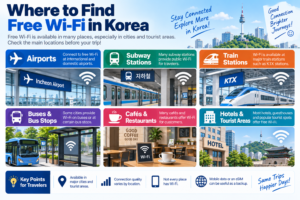
According to VISITKOREA, free public Wi-Fi is available at many public locations including airports, subway stations, train stations, and certain bus stops.
Wi-Fi is also commonly available at cafés, restaurants, shopping malls, accommodations, and major tourist areas.
However, availability and connection quality vary by location.
You should not assume that every street, bus stop, restaurant, or rural area will have a reliable free connection.
Where Can Travelers Find Free Wi-Fi?
Common places where travelers may find Wi-Fi include:
- International and domestic airports
- Subway stations
- Train stations
- Some bus stops
- Shopping malls
- Cafés
- Restaurants
- Hotels and guesthouses
- Major tourist attractions
- Public facilities
VISITKOREA specifically lists airports, subway stations, train stations, and certain bus stops as common public Wi-Fi locations.
Is Free Wi-Fi Available at Korean Airports?
Major Korean airports provide internet access for travelers.
After arriving in Korea, airport Wi-Fi can be useful for:
- Opening your hotel reservation
- Checking airport transportation
- Downloading or activating an eSIM
- Contacting your accommodation
- Checking maps before leaving the airport
It is still a good idea to prepare important travel information before your flight in case you have trouble connecting immediately after arrival.
You can save your hotel address, transportation instructions, and reservation details offline before traveling.
Can You Get Free Wi-Fi at Subway Stations?
Yes, many subway stations provide public Wi-Fi access.
This can be useful when checking:
- Your subway route
- Transfer stations
- Exit numbers
- Your destination address
- Nearby restaurants or attractions
However, a connection may become weaker or disconnect as you move between stations or travel underground.
For detailed navigation in Korea, see our
How to Use Naver Map in Korea guide
.
Is Wi-Fi Available on Buses?
Public Wi-Fi availability on buses and at bus stops varies by city and service.
Some cities provide public Wi-Fi on buses or at major bus stops, but travelers should not rely on this for every route.
VISITKOREA specifically notes that public Wi-Fi is available at certain bus stops rather than all bus stops nationwide.
How Good Is Public Wi-Fi in Seoul?
Seoul has an extensive public Wi-Fi network.
In 2026, the Seoul Metropolitan Government announced plans to replace 2,020 older public Wi-Fi units at locations including major streets, traditional markets, district offices, welfare facilities, and bus stops.
The city is also introducing newer Wi-Fi technology and expanding high-quality public Wi-Fi in major tourist destinations including Myeongdong, Seongsu, and Hangang Parks.
Even with these improvements, performance can still depend on your exact location, the number of users connected, and the condition of the local network.
How to Find Public Wi-Fi in Korea
You can look for Wi-Fi in several ways.
- Check available networks on your phone
- Look for public Wi-Fi signs
- Ask staff at your hotel, café, or tourist information center
- Check the Korean public Wi-Fi website
- Use map information where available
VISITKOREA points travelers to Korea’s public Wi-Fi website at wififree.kr.
How to Connect to Free Wi-Fi
The connection process depends on the network.
A typical process is:
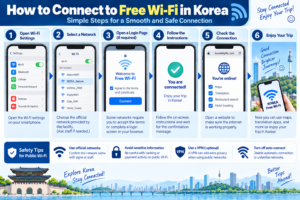
- Open the Wi-Fi settings on your phone.
- Check the available network names.
- Select the network provided by the facility or public service.
- Open your browser if a login or agreement page appears.
- Follow the displayed instructions.
- Confirm that your phone shows an active internet connection.
Some networks connect immediately, while others may require you to accept terms or complete a login screen.
How Do You Know Which Wi-Fi Network Is Correct?
Do not connect automatically to every network that appears on your phone.
If you are inside a café, hotel, airport, or other facility, check the official network name with:
- A sign inside the building
- The front desk
- A receipt
- A menu
- A staff member
A network name that looks similar to a business name does not automatically mean it belongs to that business.
Do Cafés in Korea Have Free Wi-Fi?
Many cafés provide Wi-Fi for customers.
The network name or password may be:
- Printed on your receipt
- Displayed near the counter
- Shown on a table or wall
- Available by asking staff
Policies vary by café, so do not assume that every café provides unrestricted Wi-Fi.
Do Korean Hotels Have Wi-Fi?
Wi-Fi is common at hotels and other accommodations, but the exact system varies by property.
You may receive the network name and password:
- At check-in
- On your room key holder
- Inside the room
- Through the hotel’s app or guest information page
If you are booking accommodation and reliable internet is important, check the property’s listed facilities and recent guest reviews before booking.
Can You Use Free Wi-Fi for Navigation?
Yes, but relying only on Wi-Fi can be inconvenient while moving around.
You may be connected inside a subway station or café and then lose the connection once you leave.
If you plan to use live navigation throughout the day, mobile data can be more reliable because it does not require you to find a new Wi-Fi network every time you change locations.
Before leaving a Wi-Fi connection, you can also save:
- Your destination address
- Screenshots of important routes
- Your hotel location
- Reservation confirmations
- Important Korean addresses
Is Public Wi-Fi Safe?
Public Wi-Fi can be convenient, but travelers should still use basic security precautions.
When using an unfamiliar public network:
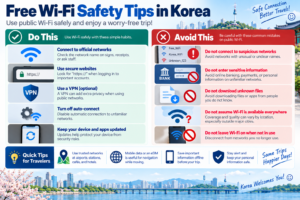
- Confirm the official network name
- Avoid entering sensitive information if the network looks suspicious
- Use websites and apps with secure connections
- Turn off automatic Wi-Fi connection if you do not need it
- Disconnect from networks you no longer use
For important banking, account, or payment activity, using your own mobile data connection may be a simpler option than relying on an unfamiliar public network.
Should You Use a VPN on Public Wi-Fi?
A reputable VPN can add another layer of privacy when using public networks, but it is not a substitute for checking that you are connecting to the correct network.
If you already use a trusted VPN service, you may choose to use it while connected to public Wi-Fi.
Travelers should still avoid suspicious networks and keep their devices and apps updated.
What If the Wi-Fi Connects but the Internet Does Not Work?
This can happen when your phone connects to the Wi-Fi network but has not completed the network’s login process.
Try these steps:
- Open your web browser.
- Check whether a login or agreement page appears.
- Disconnect and reconnect to the network.
- Move closer to the Wi-Fi access point.
- Confirm that the network is still operating.
If you are at a hotel, café, or staffed facility, ask staff whether the network name or password has changed.
Why Is Public Wi-Fi Sometimes Slow?
Public Wi-Fi speed can vary for several reasons.
- Many people may be using the network at the same time
- You may be far from the access point
- The local equipment may be older
- Your device may be switching between networks
- The location may have limited internet capacity
A busy tourist area may have strong coverage but still feel slower during peak periods.
Does Free Wi-Fi Work Everywhere in Korea?
No.
Free Wi-Fi is widely available in major cities and tourist areas, but VISITKOREA also notes that not every region has equally reliable coverage.
This matters especially if your trip includes:
- Smaller towns
- Rural areas
- Mountain destinations
- Regional road trips
- Locations far from major transportation hubs
If you need reliable internet throughout your trip, mobile data is still worth considering.
Free Wi-Fi vs eSIM: Which Is Better?
| Option | Best For | Main Limitation |
|---|---|---|
| Free Wi-Fi | Saving mobile data and using internet at fixed locations | Coverage and quality vary |
| eSIM or SIM | Navigation and internet while moving | Requires a data plan |
| Wi-Fi + Mobile Data | Most travelers who want convenience and backup access | Requires managing both connections |
VISITKOREA recommends considering a SIM card depending on your destination and using free Wi-Fi when it is available rather than relying on only one network option.
Should You Rely Only on Free Wi-Fi?
For a short trip in a major city, some travelers may be able to use a large amount of free Wi-Fi.
However, relying completely on public Wi-Fi can become inconvenient when you need internet:
- While walking between locations
- While waiting for a bus
- While using live navigation
- When calling a taxi
- When accessing a reservation urgently
- When traveling outside major cities
For many travelers, the easiest setup is to use mobile data for essential connectivity and switch to Wi-Fi when a trusted network is available.
What Should You Download Before Your Trip?
Before arriving in Korea, consider preparing:
- Naver Map or another navigation app
- A translation app
- Your airline app
- Your hotel booking app
- Transportation apps you plan to use
- Your eSIM setup information if applicable
Download important apps before departure so you are not completely dependent on airport Wi-Fi after landing.
Can You Use Wi-Fi Without a Korean Phone Number?
Many Wi-Fi networks can be used without a Korean phone number.
However, connection procedures vary by network, and some services may have their own authentication requirements.
Do not assume that every public or private Wi-Fi network uses the same login process.
Useful Korean Wi-Fi Words
| Korean | Meaning |
|---|---|
| 와이파이 | Wi-Fi |
| 무료 와이파이 | Free Wi-Fi |
| 공공 와이파이 | Public Wi-Fi |
| 비밀번호 | Password |
| 인터넷 | Internet |
| 연결 | Connect / Connection |
Useful Wi-Fi Questions in Korean
와이파이 있어요?
Do you have Wi-Fi?
와이파이 비밀번호가 뭐예요?
What is the Wi-Fi password?
무료 와이파이예요?
Is the Wi-Fi free?
Free Wi-Fi in Korea: Quick Checklist
Before your trip:
- Download important travel apps
- Save your hotel address offline
- Prepare mobile data if you need reliable connectivity
- Save important reservation details
When using public Wi-Fi:
- Confirm the correct network name
- Complete the official login screen if required
- Avoid suspicious networks
- Do not rely on Wi-Fi being available everywhere
- Use mobile data when you need a more reliable connection
Final Thoughts
Free Wi-Fi in Korea is widely available and can be extremely useful for travelers.
Airports, subway stations, train stations, tourist areas, cafés, hotels, and many public facilities provide internet access, particularly in major cities.
However, free Wi-Fi is best treated as a useful supplement rather than a guaranteed nationwide connection.
Coverage and speed vary, and you may lose access while moving between locations or traveling outside major urban areas.
For the smoothest trip, prepare important information offline, use trusted Wi-Fi when it is available, and keep mobile data as a backup when reliable internet is important.